Is Your New Website Ready for AI Search? An AI Visibility Checklist Before Launch
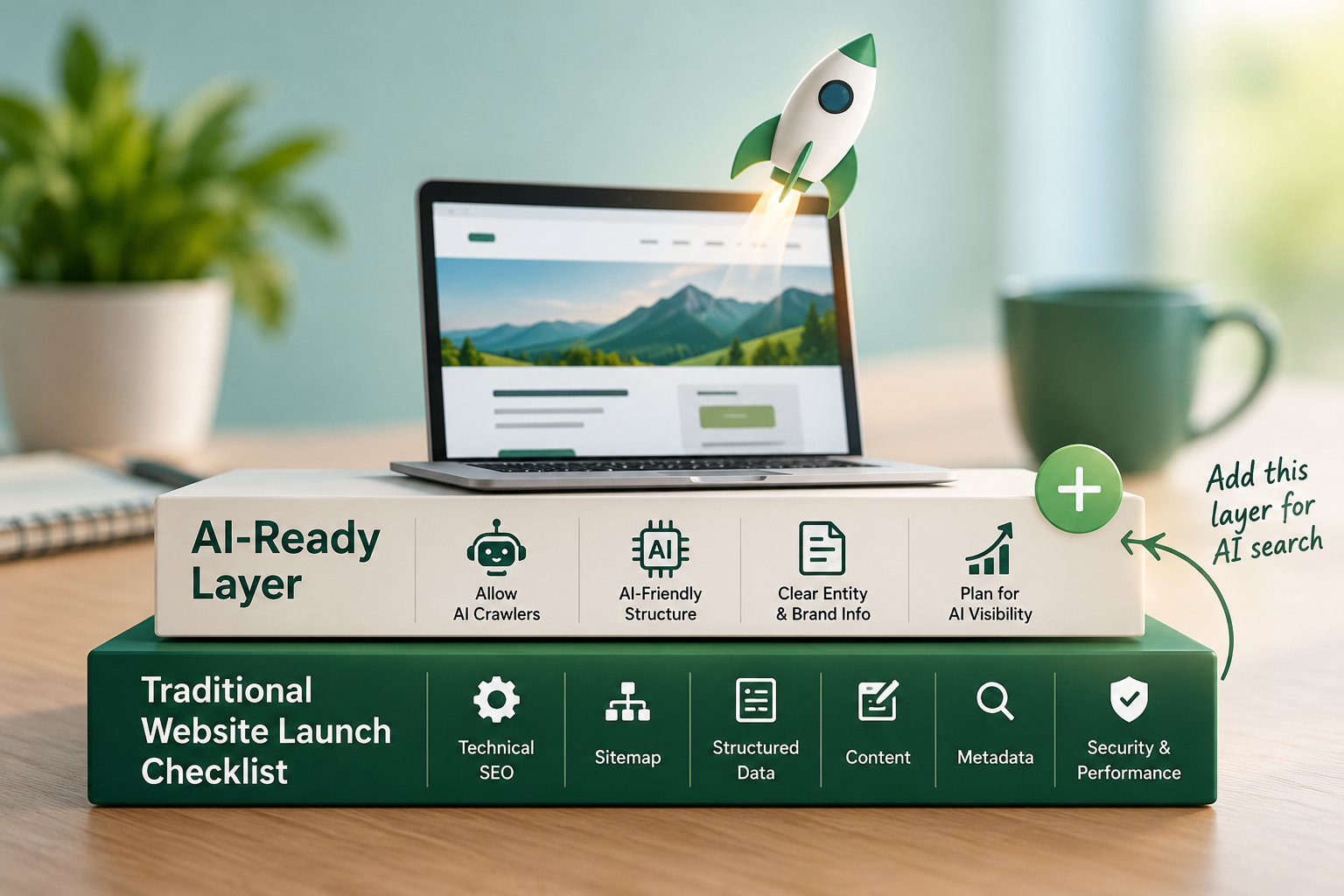
When I launched my website, I was already thinking about how it would work in AI search as well as traditional search. I looked at the usual things such as SEO, speed, security, analytics, mobile usability, and technical setup, but I also wanted to make sure the website was ready for AI systems to discover and understand.
This made me look at the website launch process from another perspective: what should we check before launching a website to make it ready for AI search?Is the website ready for AI search?
A website can be live, technically functional, and accessible to Google, yet still have problems that make it harder for search engines and AI systems to discover, crawl, understand, and use its content.
That is why I think AI search readiness should be considered before a new website goes live, rather than treated as something to fix months later.
This does not mean there is a special “AI SEO switch” you can turn on. Google continues to emphasize its existing Search fundamentals, including crawlability, useful content, technical accessibility, and structured data. Its guidance for AI search features also makes clear that there are no special technical requirements or special schema that guarantee inclusion in AI-generated results.
So what should you actually check?
Planning a website launch?
My Website Launch Checklist covers the essential SEO, technical, performance, security, analytics, and other checks to complete before going live.
Get the Website Launch Checklist
In this article, I’m focusing specifically on the additional checks I would consider for AI search readiness.
What Does an AI-Ready Website Mean?
For me, an AI-ready website has three basic characteristics:
- AI and search crawlers can access it.
- Search engines and machines can understand what the website is about.
- The website provides useful, clear, trustworthy information that can potentially be surfaced when people search for relevant topics.
This is different from AI visibility.
AI website readiness asks: Can AI systems access and understand my website?
AI visibility asks: Are AI systems actually mentioning, citing, or recommending my website?
You need the first before you can meaningfully work on the second.
My AI Visibility Checklist for a New Website
1. Check Your Robots.txt File
Start with the basics.
Your robots.txt file tells crawlers which parts of your website they can or cannot access.
Before launching, check that you are not accidentally blocking important pages.
For example, you do not want a new website to launch with something like:
User-agent: *
Disallow: /
That could prevent crawlers from accessing the entire site.
Instead, review your robots.txt file carefully and make sure important content, service pages, blog posts, and other pages you want discovered are accessible.
At the same time, you should still block areas that should not be crawled, such as admin sections, temporary files, or private areas.
It’s also worth checking access for AI crawlers that are relevant to your website. For example, OAI-SearchBot is used by OpenAI to surface websites in ChatGPT search. Make sure you are not unintentionally blocking important content that you want these systems to access.
2. Make Sure Your XML Sitemap Is Ready
Your XML sitemap helps search engines discover the important URLs on your website.
Before launch, check that your sitemap:
- Exists
- Loads correctly
- Contains your important pages
- Does not contain unnecessary URLs
- Uses the correct HTTPS URLs
- Does not include pages that should not be indexed
- Is submitted to Google Search Console
I would also check that the sitemap is referenced in your robots.txt file. Robots.txt tells crawlers what they can access. The sitemap helps them discover important URLs.
3. Check AI Crawler Access
Where possible, test whether relevant crawlers can actually access your website. I would check the major search and AI crawler groups relevant to your business, including:
- OAI-SearchBot
- Googlebot
- Bingbot
- PerplexityBot
- Claude-SearchBot
You do not necessarily need every AI crawler to access every website. The important thing is to understand which crawlers matter to your strategy and make sure you are not unintentionally blocking them.
4. Make Your Brand Identity Clear
This is an area that is often overlooked during website launches. If someone lands on your homepage, can they immediately understand:
- What is the business called?
- What does it do?
- Who founded it?
- Who does it serve?
- What products or services does it offer?
- Where is it based?
- How can people contact it?
AI systems need context.
Your website should clearly establish the relationship between your brand, people, services, products, and other relevant entities. For a business website, I would make sure the About page, homepage, Contact page, service pages, author information, and social profiles tell a consistent story.
Your brand name should also be used consistently across the website and external platforms to make information clear and consistent.
5. Add Relevant Structured Data
Structured data gives search engines machine-readable information about the content on your pages. Depending on the website, this could include:
- Organization
- Person
- Article
- BlogPosting
- Breadcrumb
- Product
- LocalBusiness
- Event
- WebSite
Google explains that structured data can help it understand content and can support certain search features.
But there is an important distinction here.
Structured data is not an AI citation guarantee. I would use the Schema.org Markup Validator and, where relevant, Google’s Rich Results Test.
6. Make Important Information Available as Text
A website may look fantastic to a human visitor but still be difficult to understand if important information is hidden inside images, graphics, videos, or interactive elements.
Your most important information should be available as crawlable page content.
For example, don’t put your entire:
- Company description
- Service list
- Product information
- Pricing information
- Contact information
- Expertise
- Key statistics
inside an image.
Use actual HTML text wherever practical. This also improves accessibility, search visibility, and usability.
7. Write Content That Answers Real Questions
AI search has changed how people search. Instead of using only short keywords, people often ask complete questions. Your website should provide clear, useful answers to the questions your audience is likely to ask.
You don’t need to create hundreds of pages to target every question. Focus on accurate, relevant, people-first content that genuinely helps your audience.
8. Build Strong Internal Links
A new website should not consist of a collection of isolated pages. Connect related pages with internal links.
For example:
Homepage → Services → Individual Service → Related Blog → Supporting Guide
This helps users navigate the site and gives crawlers additional context about how your content is related. It also helps establish topic relationships.
If you have an important service page, don’t bury it several clicks deep with no meaningful internal links pointing toward it.
9. Optimize Your Titles and Meta Descriptions
Every important page should have a clear title and meta description.
Your title should explain what the page is about. Your meta description should give users a useful summary of what they will find.
For example, instead of: Home | Company Name
you could use something that communicates the actual business offering.
The same principle applies to service pages and articles.
Do not stuff keywords into titles simply because you want to appear relevant.
Make them descriptive and useful.
10. Use FAQs When They Actually Help
I still like FAQs on websites, but I would not add them simply because someone says “AI likes FAQs.”
FAQs can be useful when your customers genuinely have recurring questions.
For example:
How long does a website redesign take?
What is included in your SEO service?
Do you provide ongoing technical SEO support?
Answer the question directly and clearly.
Also, don’t confuse useful FAQ content with Google’s former FAQ rich-result feature. Google removed documentation for the FAQ rich result in 2026, so I would not build an AI-search strategy around getting FAQ rich results.
The value of an FAQ is the information itself.
11. Check Canonicals and Indexability
Before launch, check every important page for:
- Correct canonical URL
- No accidental
noindex - Correct HTTP status code
- No unnecessary redirects
- No duplicate URLs
- Correct HTTPS version
- Correct internal links
This is particularly important when moving from a staging website to a production domain.
I have seen websites where the technical setup looked fine at first glance, but a leftover staging directive, incorrect canonical, or indexing restriction created problems after launch.
A five-minute check before launch can save a lot of troubleshooting later.
12. Check Mobile Performance and Core Web Vitals
AI search readiness does not replace normal technical SEO.
Your website still needs to work well for people.
Check:
- Mobile usability
- Page speed
- Core Web Vitals
- Layout stability
- Images
- JavaScript
- Font loading
- Forms
- Navigation
- HTTPS
Google’s Search documentation continues to emphasize technical requirements and Search fundamentals, including ensuring that pages can be crawled and indexed.
AI optimization should be part of technical SEO, not a replacement for it.
My Pre-Launch AI Website Checklist
Here is the shorter version I would keep beside me when launching a website:
| Check | What to verify |
|---|---|
| Robots.txt | Important pages aren’t blocked |
| XML sitemap | Important URLs are included |
| Indexability | Important pages can be indexed |
| AI crawlers | Relevant AI crawlers can access the site |
| Structured data | Relevant schema is present and valid |
| Organization | Brand identity is clear |
| Founder/author | Person and organization relationships are clear |
| Metadata | Titles and descriptions are meaningful |
| Content | Important information is available as text |
| Internal links | Important pages are connected |
| Canonicals | Preferred URLs are correct |
| HTTPS | Production site uses secure URLs |
| Mobile | Pages work properly on mobile |
| Performance | Core pages load efficiently |
| Search Console | Property is verified |
| Analytics | Measurement is working |
Don’t Wait Until After Launch to Think About AI Search
AI search does not need to make website launches more complicated. Most of the fundamentals are already part of good SEO:
- Make the website crawlable.
- Create a proper sitemap.
- Use accurate structured data.
- Make your brand and organization clear.
- Publish useful content.
- Build logical internal links.
- Use descriptive titles and meta descriptions.
- Keep important information accessible.
- Fix technical SEO issues.
Then add AI-specific checks, such as crawler access and AI visibility monitoring, where relevant.
AI search is not separate from SEO. A technically sound, useful, well-structured website provides a strong foundation for both traditional and AI-powered search.
If you’re launching a new website, build that foundation before you press Publish.
Final Thought
When I think about a website launch today, I no longer want to ask only: “Is the website ready for Google?”
I also want to ask: “Is the website ready to be discovered, understood, and potentially surfaced by the search systems people are using?”
That is the mindset behind an AI-ready website launch. And it is why I would add AI search readiness to every modern website launch checklist.
Related resources
If you are preparing a website for search and AI visibility, you may also find my AI SEO services useful for evaluating the technical and content side of AI search readiness.
You can also read my AI in Marketing 2026 Executive Survey to see how business leaders are approaching AI adoption and trust.
And once your website is live, the next step is measuring whether your brand is actually appearing in AI search. That is where AI visibility tracking tools become useful.
Start with the basics. Make the website technically accessible. Make the information clear. Then measure what happens.